 subtimetable
Entering data for the school timetable: teachers, classes, rooms and curriculum
You enter teachers, subjects and rooms in the “School” area. This data applies to all school years. If the school has several buildings, turn on “The school has more than one building” in “School settings” and assign a building to each room.
You enter the rest of the data step by step in “Timetable building”:
- “Calendar and bell times”: enter the school days, the start of the first period, the period length, breaks and lunch. The app builds the period grid from these values. You can then adjust the start and end of each period by hand.
- “Classes and groups”: add classes with their year and split them into groups. For a group, you enter what the class is split by, for example by language. Groups of the same split can have lessons at the same time.
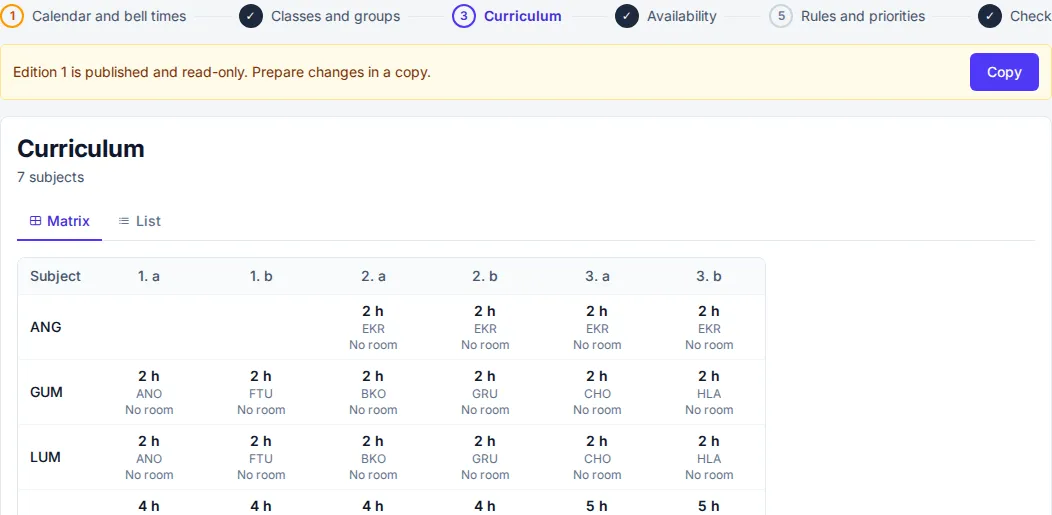
- “Curriculum”: in the matrix of classes and subjects, you set the teacher, the hours per week and the rooms where the lesson may take place for each cell. You enter a double lesson with the block length, for example 2 periods together. You enter a lesson shared by several classes once and add the classes under “Together with other classes”.
You create the next school year from the current one. In “New school year”, under “Start with”, you choose “Copy from year”. The app moves each class up one year and does not carry over the classes of the final year.