 subtimetable
Teachers and deputies get an invitation by email
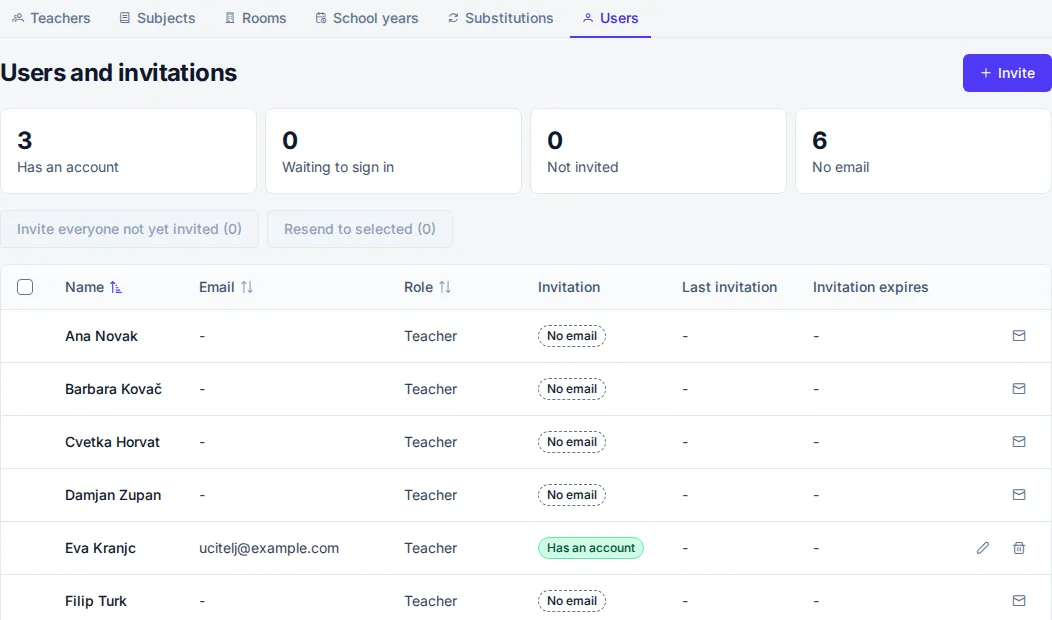
The principal and the assistant head send invitations on the “Users” page. Only the principal can invite a new principal.
- Click “Invite”.
- In the “Invite a user” window, enter the email and choose a role. For the Teacher role, you also choose which teacher it is in the “Teacher from the timetable” field.
- Click “Send invitation”.
A user with the Teacher role must be linked to an entry in the “Teachers” list. So you can invite an assistant head and viewers right away, but teachers only once they are entered in the Data entry step. Then you invite them all at once with the “Invite everyone not yet invited” button. The number in brackets tells how many invitations will go out. A teacher without an email gets no invitation.
An invitation is valid for 7 days. You resend an expired invitation with “Resend” or cancel it.
Roles:
- Principal edits everything in the app, including school settings and other principals.
- Assistant head edits school data, builds and publishes the timetable, and manages substitutions and users.
- Viewer sees school data and the published timetable and writes comments.
- Teacher sees the published school timetable and their own timetable, writes comments and reports their own absence.
One user belongs to one school.