 subtimetable
When you publish the school timetable, teachers see it in My timetable
- In “Versions”, click “Publish” on the version you want to publish.
- In the “Publish version” window, choose the date in “Valid from”.
- Read what happens on publishing and confirm with “Publish”.
Before you confirm, the window shows how many periods have a room conflict, how many comments are still open and which teachers do not have an account yet. When the school already manages substitutions, you also see which confirmed substitutions need a new substitute because of the new timetable. Publishing is possible even when room conflicts remain.
The principal or the assistant head publishes the timetable. You change the valid-from date later with “Move the start”.
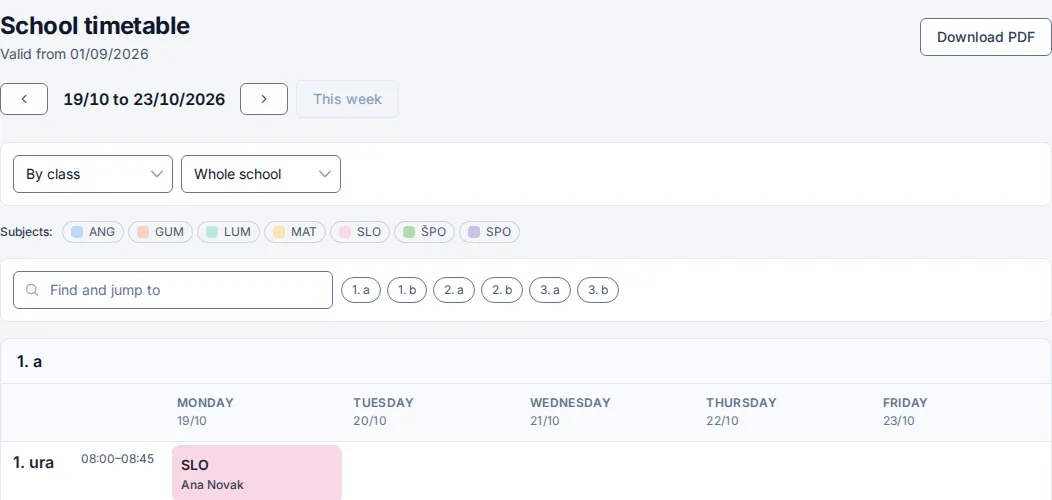
After publishing, teachers see the timetable in “My timetable” and “School timetable”. You show the school timetable “By class”, “By teacher” or “By room”.
With “Download PDF” you choose the scope, for example one class or “All teachers”, the orientation “Portrait” or “Landscape”, and “Colour” or “Black and white”.